【アップデート2.1】公開テスト実施中!

パッチノート

第1回公開テストの変更点一覧

展開

主な変更点

Advent Calendar

Resources for the Advent Calendar have been added for testing. It will be available in the first Common Test from November 7.

Interface Improvements

My Vehicles Screen

At the top of the screen, above the vehicle list, toggles have been added allowing players to:

  1. Display crew members with their trained perks on the left side of the screen.
  2. Hide the vehicle characteristics panel on the right side of the screen.
  3. Enable or disable both panels simultaneously.

Battle Results Screen

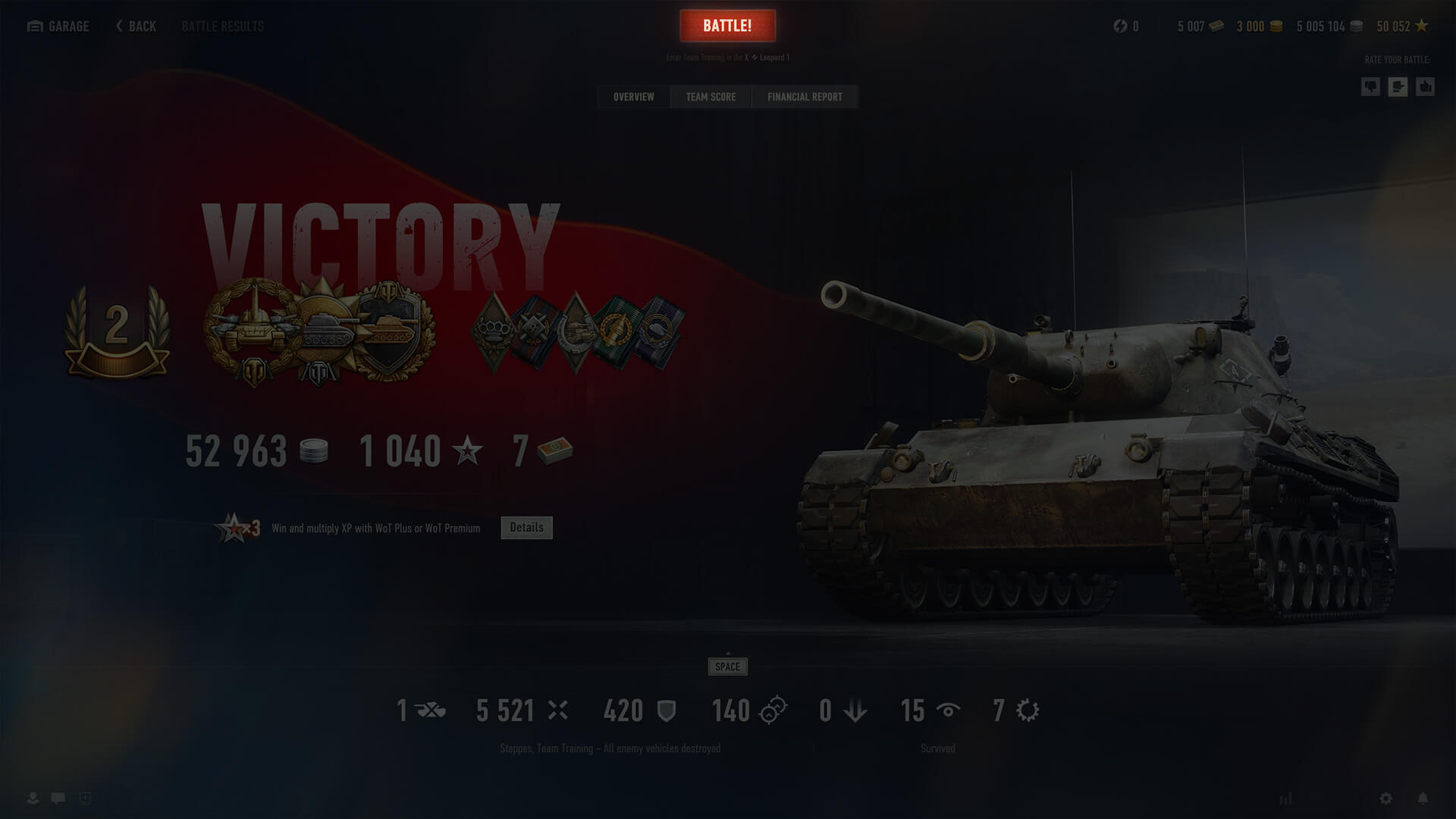
All tabs on the post-battle statistics screen now include a button that lets players either enter a new battle or confirm/cancel their readiness when playing in a Platoon.

Below the button, the selected mode and the vehicle for the next battle are displayed.

Vehicle Menu

Hotkeys have been added to the menu in the center of the Garage and the My Vehicles screen, allowing for quick navigation to important screens—About Vehicle, crew, and customization—and enabling key actions linked to them.

Vehicle Filter

The filter button in the Garage and on the My Vehicles screen now displays the number of selected vehicles/the total number of vehicles on the player's account when a user-created or imported Playlist is selected.

Random Events

This update introduces new Random Events that change the dynamic of battle and expand tactical opportunities on three maps:

Mountain Pass

A German fighter jet crashes into the support of the bridge in D6, bringing it down and opening a new route from the gorge to the heights above.

Highway

A Japanese airstrike leaves a freight train scattered across the railroad tracks. Its derailed wagons provide cover in squares K9–0, blocking long-distance lines of fire and adding tactical variety.

Ghost Town

Two MiG-21s strike the town's central sector with precision missiles. The resulting destruction reshapes the E6–F7 area, exposing new routes and elevated platforms and creating opportunities for more dynamic heavy-vehicle engagements.

Sound Physics Simulation

A new sound physics system based on map geometry has been added for Random Battles in this Common Test, changing how vehicles sound depending on their position relative to objects on the map.

The types of sound simulation include:

  • Transmission: Simulates how nearby gunfire is blocked by obstacles such as walls, ceilings, or mountains.
  • Diffraction: Simulates how engine and track sounds bend around the corners of buildings and large objects.
  • Reflections: Simulate early reflections of your vehicle's sounds bouncing off nearby surfaces.

New sound presets have also been added to the game settings and are automatically adjusted to the player's graphical configuration to ensure optimal performance and quality.

These changes are designed to help players more accurately locate enemies and allies using audio signals. They may slightly increase system load.

The sound physics simulation feature is available on the following Random Battles maps:

  • Lakeville
  • Himmelsdorf
  • Ruinberg
  • Berlin
  • Paris
  • Safe Haven
  • Fjords
  • Ensk
  • Pilsen
  • Siegfried Line
  • Widepark
  • Live Oaks
  • Malinovka
  • Oyster Bay
  • Airfield
  • Fisherman's Bay
  • Karelia
  • Murovanka
  • Cliff
  • Redshire

Vehicles

U.S.S.R.

The following vehicle has been added:

  • T-115 — Tier V medium tank

Germany

The following vehicle has been added:

  • Rheinmetall Begleitwagen — Tier III medium tank

France

The following vehicle has been added:

  • Renault R35/FCM 36 — Tier II light tank

U.K.

The following vehicles have been added:

  • Taurus CAT — Tier VIII support tank destroyer
  • Cromwell Applique — Tier V medium tank

Japan

The following vehicle has been added:

  • Saryuda — Tier IX versatile tank destroyer

Czechoslovakia

The following vehicles have been added:

  • Škoda T 15A — Tier IV light tank
  • Jezevec — Tier VIII support medium tank

Sweden

The following vehicle has been added:

  • Strv m/31 — Tier III light tank
たたむ

第2回公開テストの変更点一覧

展開

Fixed Issues and Improvements

  • Fixed the issue of values not changing continuously when holding down the LMB on the stepper in the Quick Training screen.
  • Fixed the issue of the crew widget not activating the auto-selection after sending all crew members to the Barracks.
  • Fixed the issue of the crew interaction buttons not being displayed in special Garages.
  • Fixed the issue of players being sent to the Random Battle Garage after clicking "To Profile" on the Specialization change screen.
  • Fixed the issue of the crew member auto-selection not working when using the "Train for Vehicle" and "Replace Crew Member" options in the context menu.
  • Fixed the issue the reward icon remaining on the Frontline widget after the player gained a new Frontline level and claimed the reward immediately after the battle.
  • Fixed the issue of the central button in the vehicle menu being displayed as disabled when the current vehicle is in battle.
  • Fixed the issue of the crew menu button in the Quick Training menu being displayed as active when all current crew perks are fully trained.
  • Fixed the issue of reward bonds not being displayed on the Overview tab of the battle results screen after completing a mission.
  • Fixed the issue of the vehicle context menu not closing when other screens are opened using the crew menu hotkeys.
  • Fixed the issue of WoT Premium account days being displayed incorrectly in the Garage and Account Profile.
  • Fixed the issue of the destroyed amphitheater elements hovering in the air on the Abbey map.
  • Fixed the issue of Personal Reserve icons being displayed incorrectly in the game resource widget at certain screen resolutions.
  • Fixed the issue of 3D attachments appearing blurred during vehicle movement when the Motion Blur Effect option is enabled in the Graphics settings.
  • Fixed some interface issues.
たたむ

戦車長の諸君!

アップデート2.1の公開テストを開始したぞ。ド派手な新ランダムイベントが追加された3つのマップのほか、『World of Tanks』のプレイをよりスムーズにするための改善されたUI、音をより鮮明に捉え、戦場での立ち回りを高める新たなサウンド機能を体験してくれたまえ。

公開テストに登場する新要素はどれも開発段階にある点にご留意いただきたい。テスト内で表示される数値や報酬、車輌の性能、その他の設定はあくまでも開発中のもので、正式リリースに伴い変更が加えられる可能性がある。

新たな「ランダムイベント」

アップデート2.1でランダムイベントの発生マップが拡大される。今回新たに「山岳路」、「高速道路」、「ゴーストタウン」の3つのマップでもランダムイベントが発生するようになるぞ。以下がランダムイベントの内容だ。

  • 【山岳路】鉄道橋が砲撃を受けて崩落し、峡谷の両側に新たな高低差ルートが形成される。
  • 【高速道路】 市街地の外を走行中の列車が空襲を受けて脱線し、市街地へ突っ込む。新たな遮蔽物が出現し、一部の射撃ポジションが塞がれる。これにより、より戦略的な機動が求められる。
  • 【ゴーストタウン】中央エリアが爆撃され、一部の建物が倒壊して新たなチャンスと射撃ポジションが生まれる。

ランダムイベントの概要

展開
  • 「ランダムイベント」とは、特定の場所と時間に発生し、マップの広範囲に影響を与えるメカニズムのことだ。「ランダムイベント」が発生した場所には、新たなルートが生まれたり、逆にルートが塞がったりするほか、それまでなかった遮蔽物や射撃ポジションが生まれたりなど、大きな変化が生じる。
  • 「ランダムイベント」が発生するエリアには赤い煙が表示されるようになるほか、影響を受けるエリアに近付くと警告が表示される。また、こうしたエリアに入るとイベント開始までのカウントダウンが表示されるぞ。この時間を利用して、「ランダムイベント」の範囲内または範囲外で、戦略的なポジションを確保しておくのもひとつの手だ。ただし「イベント」が発生した際に影響を受けるエリア内にいると、障害物に当たって車輌が大破してしまう可能性もあるため、注意が必要となる。
たたむ

UIの改善

諸君から寄せられたご意見を反映し、ガレージのUIを各所で磨き上げた。よりスムーズで便利な使い心地になっているはずだ。ぜひ見て確かめていただきたい。

搭乗員画面の復活

自分の車輌を閲覧中、「搭乗員」タブと「車輌性能」タブを簡単に切り替えられるようになったぞ。「搭乗員」画面では、習得済みのパークと進捗が再び明確に表示される。各搭乗員にいちいちカーソルを合わせる必要はなくなった。

戦闘結果画面の「戦闘開始!」ボタン

諸君から多く希望する声があったため、「戦闘開始!」ボタンが戦闘結果画面上で直接使えるようになったぞ。すぐに次の戦闘に突入したい気分なら、ボタンをクリックして即出撃できる。もうガレージに戻る必要はない。

クイックアクセスのショートカットキー

新しいショートカットキーで「搭乗員」、「塗装」、「車輌比較」といった主要メニューをすぐに開けるぞ。余計なクリックは不要。必要な場所へより速く辿り着くのだ。

サウンド物理シミュレーション

今回の公開テストで「ランダム戦」向けに新たに登場するもうひとつの機能は、マップの地形に基づくサウンド物理シミュレーションだ。この技術は、音と環境の相互作用を高める働きがある。今後は、マップ上のオブジェクトに対する位置関係次第で、自車輌や周囲の車輌のサウンドの聞こえ方が変わるぞ。

オーディオ・ジオメトリを備えたマップでは、音の伝播がいくつかのタイプのシミュレーションに影響されるようになったぞ。以下に紹介しよう。

  • 【伝達】壁や天井、山脈などの障害物によって、近くの砲撃音がどのように遮られるかをシミュレート
  • 【回折】建物や大きなオブジェクトの角を回り込むように、エンジン音と履帯音が《折れる》様子をシミュレート
  • 【反射】自車輌の音が周囲の地形や構造物で跳ね返る初期反射音をシミュレート

この変更によって、戦場の音響はさらに没入感が増し、情報性も高まる。音の手がかりから敵味方の位置をより正確に把握できるようになるぞ。

さらに、ゲーム設定にサウンド・プリセットが新登場するぞ。この機能は自分のグラフィック設定に応じて自動調整され、最高の品質とパフォーマンスを約束する。

システム負荷をわずかに増やす場合があるものの、視認性と空間認識の精度が上がるメリットは十分にあるはずだ。

サウンド物理シミュレーション機能は、以下の「ランダム戦」マップで利用できる。

  • 湖の村
  • ヒメルズドルフ
  • ルインベルク
  • ベルリン
  • パリ
  • 山間の港湾
  • フィヨルド
  • エンスク
  • ピルゼン
  • ジークフリート線
  • ワイドパーク
  • ライヴオーク
  • マリノフカ
  • オイスター・ベイ
  • 飛行場
  • 漁師の港
  • カレリア
  • ムロヴァンカ
  • レッドシャイア

アドベント・カレンダー

「アドベント・カレンダー」は、2025年11月7日より第1回公開テストに登場する。その時になったらまた来て試してみてくれたまえ!

テスト内で入手できる報酬はすべてテスト用のもので、正式なゲーム・クライアント内で入手できるものとは異なる点にご注意いただきたい。

毎年恒例の「アドベント・カレンダー」が、公開テスト内に登場する。「アドベント・カレンダー」画面は、ガレージ内のインタラクティブ3Dオブジェクト(ショーケース)をクリックすることでアクセスできる。

メカニズムは今までと変わらず、毎日扉を開けるだけで無料のゲーム内アイテムを入手できる。扉を開けそびれてしまった日があっても、1日前までなら、その日の扉と合わせて開けることができるようになっているため安心だ。

『World of Tanks』公開テスト

「公開テスト」とは、公式リリースの前に次のアップデートで実装予定の新コンテンツを試すことができるテスト・サーバーのことを指す。テストに参加すると実装が予定されている新機能、新たなゲームモードや車輌、その他の変更点などを一足先に試すことができる。さらに、気になった点について開発チームにフィードバックを送ることができるのもメリットのひとつと言える。そして、開発チームにとっても、受け取ったフィードバックを基に問題点を早期に発見して、正式リリース前に対処できるというメリットがある。つまり、双方にとっていいこと尽くしなのが「公開テスト」だ。

  • 公開テストの参加方法
  • 初めてテストに参加する場合は?

公開テストに参加するには、Wargaming.net Game Center(WGC)、 最新の公開テスト用クライアント、そして参加登録の締切日(以下を参照)以前に作成されたWargaming.netアカウントが必要となる。

参加条件

日本時間10月28日07:00 までにアカウントを作成しているプレイヤーであれば誰でも公開テストに参加できるようになっている。

テスト用のクライアントのダウンロードとインストールの手順

テスト用クライアントのインストーラーをダウンロード

  • テスト用クライアントのインストーラーを実行する。
  • 普段『World of Tanks』のファイルを保存しているファイルとは別のインストール用フォルダーを選択する。
  • WGC上部のドロップダウンメニューから新しくインストールされたテストクライアントを選択する。
  • これでテストに参加できる。フィードバックも忘れずにお送りいただきたい。

WGCについての詳しい情報はWargaming.net Game Centerガイドで確認してくれたまえ。

テストへの参加が初めての場合は、公開テスト、サンドボックステスト、そしてスーパーテストに関する詳細ガイドもぜひチェックしておくと良いだろう。

テストガイド

ぜひ公開テストに参加して、改善点や追加要素を試し、諸君の意見を聞かせてくれたまえ!