- เข้าใช้ไม่ได้ ลงชื่อใช้งาน หรือ สร้างบัญชี
- ข้อมูลของฉัน ลงชื่อออก
-
ปิด
- ทัวร์นาเมนต์
Wargaming.net Game Center: The Next Step
From November 12, the updated Wargaming.net Game Center (WGC) becomes the main launcher.
The switch will happen automatically—you don't need to take any action.
Since its first introduction, we've put a lot of effort into optimizing and refining the launcher, and most players have already made the switch. A clearer interface, better scaling, and customizable game order make everyday use easier.
You can still return to the previous version for now, but we recommend staying with the updated WGC, as it will soon be the only version. On Steam, the update is permanent and can't be reversed.
What's Improved
We've made further improvements to the Wargaming.net Game Center, using your feedback to guide both visible changes and technical fixes:
- Improved scaling
The interface now works better with different screen resolutions and system display settings. -
Customizable game order
You can now rearrange your installed games in the top menu. -
Gift purchases You can now buy items as gifts for your friends, clan members, and other players directly in the new WGC.
- Bigger buttons and larger fonts
The Play and Install buttons are now easier to see and use, while larger fonts make text easier to read across the interface. -
Improved performance and technical fixes We've improved the launcher's performance and fixed a number of issues, including a memory leak and problems with sleep mode. Further optimizations are on the way.
Do I need to reinstall my games?
No. Your installed games remain exactly where they are. Switching versions does not require any reinstallation.
Will I lose my progress or settings?
No. Your account, settings, and progress are tied to your Wargaming account, not to the launcher's appearance.
Where can I share feedback?
You can leave your feedback via the official World of Tanks Discord channel in the dedicated Feedback thread.
Your input helps us fine-tune the experience.
Where can I report technical issues and bugs?
Please submit a ticket to World of Tanks Player Support if you encounter any problems with the new WGC. Make sure to include details on how to reproduce the issue and the WGC report file.
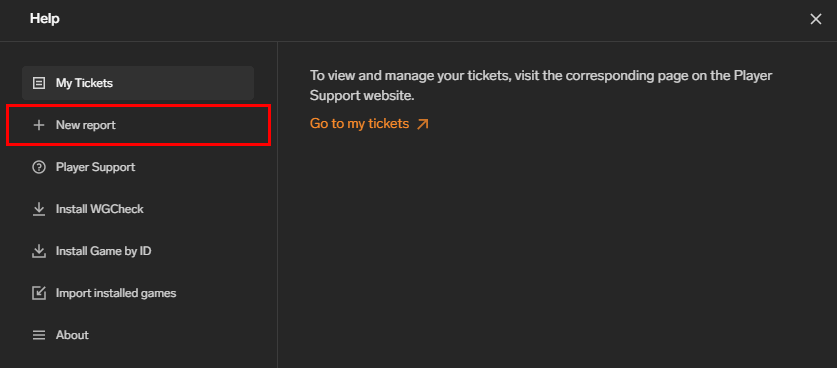
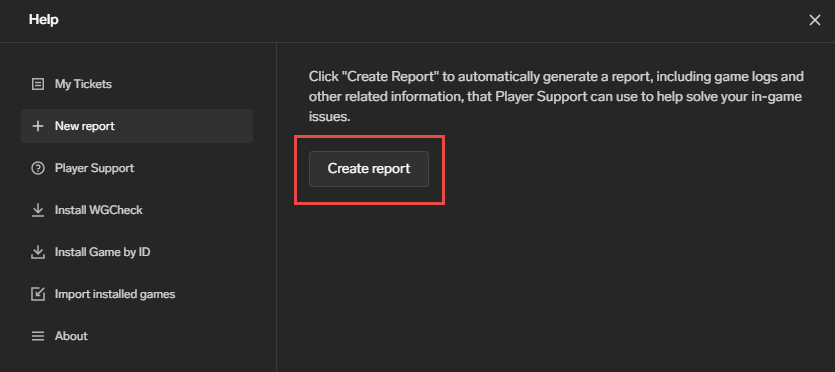
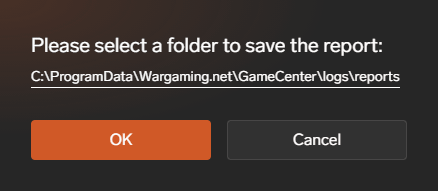
Creating a WGC report:
1. Go to the Help menu

2. Select the "New Report" option
3. Click "Create report"
4. Select a directory/folder on your computer to save the file and click OK
Will the WGC be updated on Steam?
Yes. From November 12, the updated launcher will replace the previous version on Steam, and switching back will not be possible.
Can I try the new WGC version on macOS?
Yes. You can switch to the updated design by clicking the Diamond icon in your current WGC.
Is this update available for all regions?
Yes, the functionality remains identical across regions.
How do I switch to the new WGC version?
Open the previous WGC and select the Diamond icon to switch to the updated version.
Can I switch back to the previous version?
Yes. If you prefer the previous look, you can roll back to the classic WGC look in the launcher settings. But we recommend staying with the updated WGC, as it will soon become the only available version.
Continue With the Updated WGC
The updated Wargaming.net Game Center is where future improvements will be made.
Stay with the updated WGC to get familiar with the features and changes that will shape what comes next.
ผลิตภัณฑ์นี้ไม่ได้รับอนุญาต, สนับสนุนและ/หรือเกี่ยวข้องใดๆกับรัฐบาลกลาง,รัฐและ/หรือรัฐอธิปไตยหรือสาขากองทัพใดๆบนโลก เครื่องหมายการค้าและสิทธิเครื่องหมายการค้าของยานพาหนะทหารนั้นเป็นทรัพย์สินของผู้ถือสิทธินั้นๆ การอ้างอิงใดๆเกี่ยวกับการออกแบบ, รุ่น, ผู้ผลิตและ/หรือการปรับแต่งของยานพาหนะทหารใดๆนั้นมีไว้เพื่อความถูกต้องตามประวัติศาสตร์เท่านั้นและไม่ได้เป็นการระบุว่ามีการสนับสนุนหรือรับรองจากเจ้าของเครื่องหมายการค้านั้นๆแต่อย่างใด คุณลักษณะของรุ่นพาหนะทั้งหมดนั้นถูกสร้างขึ้นอย่างสมจริงตามพื้นฐานคุณลักษณะทางเทคนิคของพาหนะทหารของศตวรรษที่ 20 เครื่องหมายการค้าและสิทธิเครื่องหมายการค้าของยานพาหนะทหารนั้นเป็นทรัพย์สินของผู้ถือสิทธินั้นๆ
© 2009–2026 Wargaming.net สงวนสิทธิ์ทั้งหมด