Update 2.1: Join the Common Test!

Patch Notes

Common Test 1: List of Changes

Expand

Main Changes

Advent Calendar

Resources for the Advent Calendar have been added for testing. It will be available in the first Common Test from November 7.

Interface Improvements

My Vehicles Screen

At the top of the screen, above the vehicle list, toggles have been added allowing players to:

  1. Display crew members with their trained perks on the left side of the screen.
  2. Hide the vehicle characteristics panel on the right side of the screen.
  3. Enable or disable both panels simultaneously.

Battle Results Screen

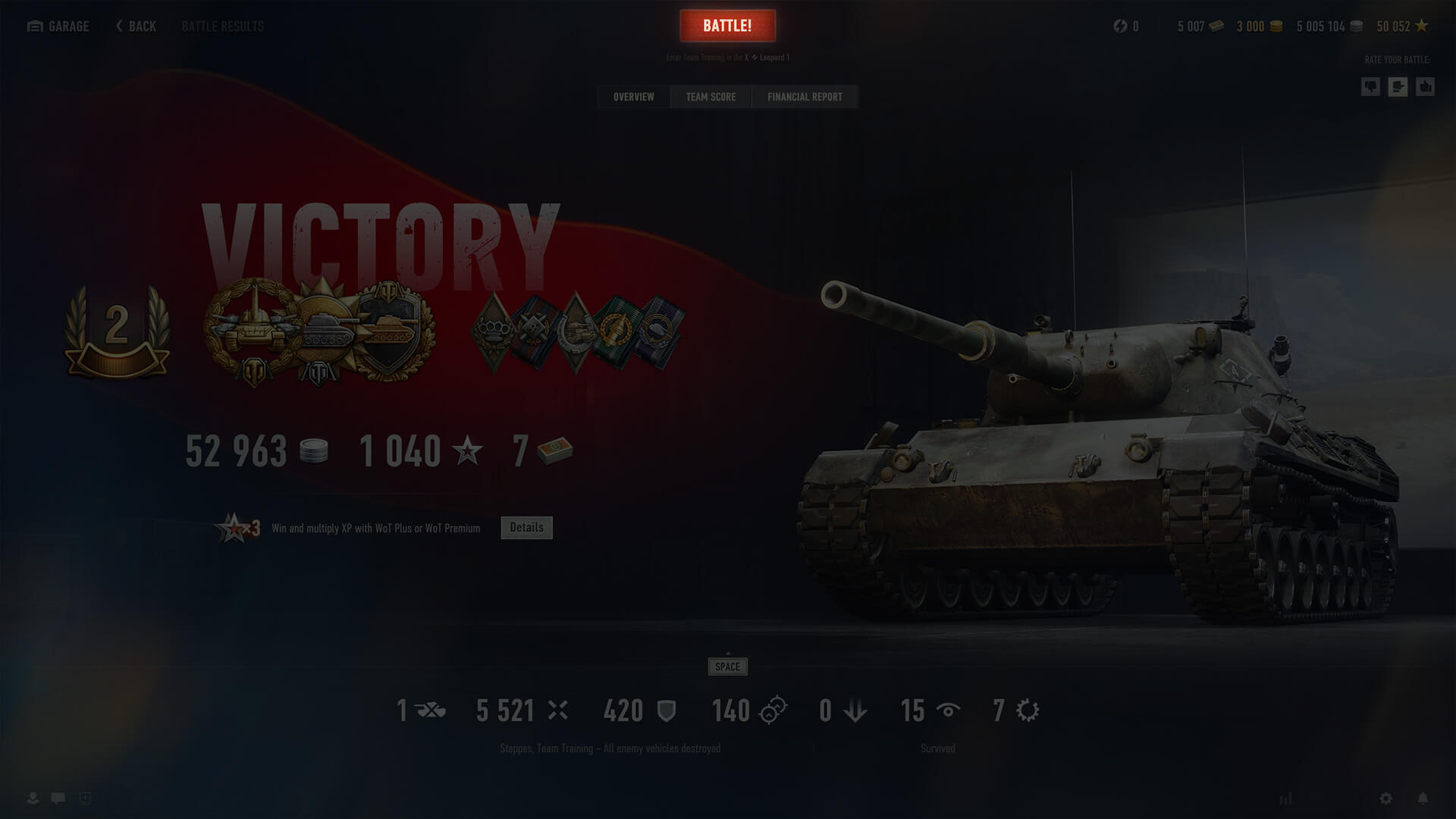
All tabs on the post-battle statistics screen now include a button that lets players either enter a new battle or confirm/cancel their readiness when playing in a Platoon.

Below the button, the selected mode and the vehicle for the next battle are displayed.

Vehicle Menu

Hotkeys have been added to the menu in the center of the Garage and the My Vehicles screen, allowing for quick navigation to important screens—About Vehicle, crew, and customization—and enabling key actions linked to them.

Vehicle Filter

The filter button in the Garage and on the My Vehicles screen now displays the number of selected vehicles/the total number of vehicles on the player's account when a user-created or imported Playlist is selected.

Random Events

This update introduces new Random Events that change the dynamic of battle and expand tactical opportunities on three maps:

Mountain Pass

A German fighter jet crashes into the support of the bridge in D6, bringing it down and opening a new route from the gorge to the heights above.

Highway

A Japanese airstrike leaves a freight train scattered across the railroad tracks. Its derailed wagons provide cover in squares K9–0, blocking long-distance lines of fire and adding tactical variety.

Ghost Town

Two MiG-21s strike the town's central sector with precision missiles. The resulting destruction reshapes the E6–F7 area, exposing new routes and elevated platforms and creating opportunities for more dynamic heavy-vehicle engagements.

Sound Physics Simulation

A new sound physics system based on map geometry has been added for Random Battles in this Common Test, changing how vehicles sound depending on their position relative to objects on the map.

The types of sound simulation include:

  • Transmission: Simulates how nearby gunfire is blocked by obstacles such as walls, ceilings, or mountains.
  • Diffraction: Simulates how engine and track sounds bend around the corners of buildings and large objects.
  • Reflections: Simulate early reflections of your vehicle's sounds bouncing off nearby surfaces.

New sound presets have also been added to the game settings and are automatically adjusted to the player's graphical configuration to ensure optimal performance and quality.

These changes are designed to help players more accurately locate enemies and allies using audio signals. They may slightly increase system load.

The sound physics simulation feature is available on the following Random Battles maps:

  • Lakeville
  • Himmelsdorf
  • Ruinberg
  • Berlin
  • Paris
  • Safe Haven
  • Fjords
  • Ensk
  • Pilsen
  • Siegfried Line
  • Widepark
  • Live Oaks
  • Malinovka
  • Oyster Bay
  • Airfield
  • Fisherman's Bay
  • Karelia
  • Murovanka
  • Cliff
  • Redshire

Vehicles

U.S.S.R.

The following vehicle has been added:

  • T-115 — Tier V medium tank

Germany

The following vehicle has been added:

  • Rheinmetall Begleitwagen — Tier III medium tank

France

The following vehicle has been added:

  • Renault R35/FCM 36 — Tier II light tank

U.K.

The following vehicles have been added:

  • Taurus CAT — Tier VIII support tank destroyer
  • Cromwell Applique — Tier V medium tank

Japan

The following vehicle has been added:

  • Saryuda — Tier IX versatile tank destroyer

Czechoslovakia

The following vehicles have been added:

  • Škoda T 15A — Tier IV light tank
  • Jezevec — Tier VIII support medium tank

Sweden

The following vehicle has been added:

  • Strv m/31 — Tier III light tank
Collapse

Common Test 2: List of Changes

Expand

Fixed Issues and Improvements

  • Fixed the issue of values not changing continuously when holding down the LMB on the stepper in the Quick Training screen.
  • Fixed the issue of the crew widget not activating the auto-selection after sending all crew members to the Barracks.
  • Fixed the issue of the crew interaction buttons not being displayed in special Garages.
  • Fixed the issue of players being sent to the Random Battle Garage after clicking "To Profile" on the Specialization change screen.
  • Fixed the issue of the crew member auto-selection not working when using the "Train for Vehicle" and "Replace Crew Member" options in the context menu.
  • Fixed the issue the reward icon remaining on the Frontline widget after the player gained a new Frontline level and claimed the reward immediately after the battle.
  • Fixed the issue of the central button in the vehicle menu being displayed as disabled when the current vehicle is in battle.
  • Fixed the issue of the crew menu button in the Quick Training menu being displayed as active when all current crew perks are fully trained.
  • Fixed the issue of reward bonds not being displayed on the Overview tab of the battle results screen after completing a mission.
  • Fixed the issue of the vehicle context menu not closing when other screens are opened using the crew menu hotkeys.
  • Fixed the issue of WoT Premium account days being displayed incorrectly in the Garage and Account Profile.
  • Fixed the issue of the destroyed amphitheater elements hovering in the air on the Abbey map.
  • Fixed the issue of Personal Reserve icons being displayed incorrectly in the game resource widget at certain screen resolutions.
  • Fixed the issue of 3D attachments appearing blurred during vehicle movement when the Motion Blur Effect option is enabled in the Graphics settings.
  • Fixed some interface issues.
Collapse

Commanders,

The Update 2.1 Common Test has begun! Jump in now to experience spectacular new random events on three additional maps, enjoy interface improvements that make your interaction with World of Tanks even smoother, and test an enhanced sound system that lets you hear and navigate the battlefield better.

All features in the Common Test are currently in active development. Any values, rewards, technical characteristics, and other feature settings relevant to the Common Test are not final and may not correspond to those in the release version.

New Random Events

With Update 2.1, World of Tanks expands its roster of dynamic random events to three more maps: Mountain Pass, Highway, and Ghost Town. Here's what to expect:

  • Mountain Pass: The bridge is bombarded and collapses, creating new elevation routes on both sides of the gorge.
  • Highway: A train outside the town is struck by an air raid and derails, crashing into the city area. New cover appears while some firing lines are blocked, encouraging more tactical maneuvers.
  • Ghost Town: The central district comes under bombardment. Several buildings are destroyed, revealing fresh opportunities and firing positions.

A Brief Recap of Random Events

Expand
  • Random events occur at specific times, significantly affecting extensive areas of the maps. This impact creates fresh pathways for vehicles, potentially obstructing existing ones, while also establishing new cover and firing positions.
  • The random event zone will be marked by red smoke. As you approach its border, a warning notification will appear. Upon entering the zone, the countdown to the event launch begins. Use this time to take up the most strategic position within or outside the zone. Be cautious of collisions with large objects generated during the event, as they may destroy your vehicle.
Collapse

Interface Improvements

We've taken your feedback on board and refined several parts of the Garage interface to make your experience smoother and more convenient. Take a look.

Crew Display Is Back

When viewing your vehicles, you can now easily switch between the Crew and Vehicle Parameters tabs. The crew view once again clearly shows all learned perks and progress—no need to hover over every crew member.

Battle! Button on the Post-Battle Screen

You asked for it—and we did it! The Battle! button is now available directly on the post-battle results screen. If you're eager to jump straight into your next match, just click and roll out—no need to return to the Garage first.

Quick Access Hotkeys

New hotkeys let you instantly open key menus like Crew, Customization, and Vehicle Comparison. Get where you need to go faster, without unnecessary clicks.

Sound Physics Simulation

Another feature debuting in this Common Test is sound physics simulation based on the map's geometry for Random Battles. This technology enhances how sounds interact with the environment. You'll now hear your vehicle and nearby tanks differently depending on their and your positions relative to the objects on the map.

Sound propagation on maps with audio geometry is now influenced by several types of simulation:

  • Transmission: simulates how nearby gunfire is blocked by obstacles such as walls, ceilings, or mountains.
  • Diffraction: simulates how engine and track sounds bend around corners of buildings and large objects.
  • Reflections: simulate early reflections of your tank's sounds bouncing off nearby surfaces.

These changes make the battlefield soundscape more immersive and informative, helping you more accurately locate opponents and allies through audio signals.

Additionally, new sound presets are now available in the game settings, automatically adjusted to your graphical configuration to ensure optimal performance and quality.

This feature may slightly increase system load, but the improvement in clarity and spatial accuracy is well worth it!

The sound physics simulation feature is available on the following Random Battle maps:

  • Lakeville
  • Himmelsdorf
  • Ruinberg
  • Berlin
  • Paris
  • Safe Haven
  • Fjords
  • Ensk
  • Pilsen
  • Siegfried Line
  • Widepark
  • Live Oaks
  • Malinovka
  • Oyster Bay
  • Airfield
  • Fisherman's Bay
  • Karelia
  • Murovanka
  • Cliff
  • Redshire

Advent Calendar

The Advent Calendar in Common Test 1 will be available on November 7, 2025. Check back then to start testing!

All Advent Calendar rewards are for testing purposes and will be replaced with different items upon the feature's release.

The Advent Calendar is available for preliminary testing. To access it, click on the interactive 3D object (display case) in your Garage.

The mechanics of this feature are simple: Open doors each day to receive your free in-game items. If you miss a day, no worries—you can still claim the previous day's reward when you next log in, along with the current day's gift.

How to Join the World of Tanks Common Test

The Common Test offers a sneak peek at the upcoming game version before its official release. We're eager to hear your initial thoughts on the upcoming features, new game modes, vehicles, game changes, and more. This will help us understand how the community feels about the next update and catch issues ahead of time.

  • How to Participate in the Common Test
  • New to Testing?

To take part, you'll need the Wargaming.net Game Center (WGC), the latest Common Test game client, and an active World of Tanks account created prior to the cut-off date (see below).

Eligibility

All active World of Tanks accounts created before October 28 at 06:00 UTC+8 can participate in the test.

Download and Install the Test Client

TEST CLIENT INSTALLER

  • Run the test client installer.
  • Choose a different installation folder from where your regular World of Tanks game files are.
  • Select the freshly installed test client from the dropdown menu at the top of the WGC.
  • Roll out—and remember to pass on your feedback!

You can find more details about the WGC in the dedicated Wargaming.net Game Center guide.

Check out our handy public test guide with all the details about Common Tests, Sandbox Tests, and Supertests.

TESTING GUIDE

Join the Common Test to try out the improvements and additions, and let us know what you think, Commanders!