Resources for the Advent Calendar have been added for testing. It will be available in the first Common Test from November 7.
At the top of the screen, above the vehicle list, toggles have been added allowing players to:
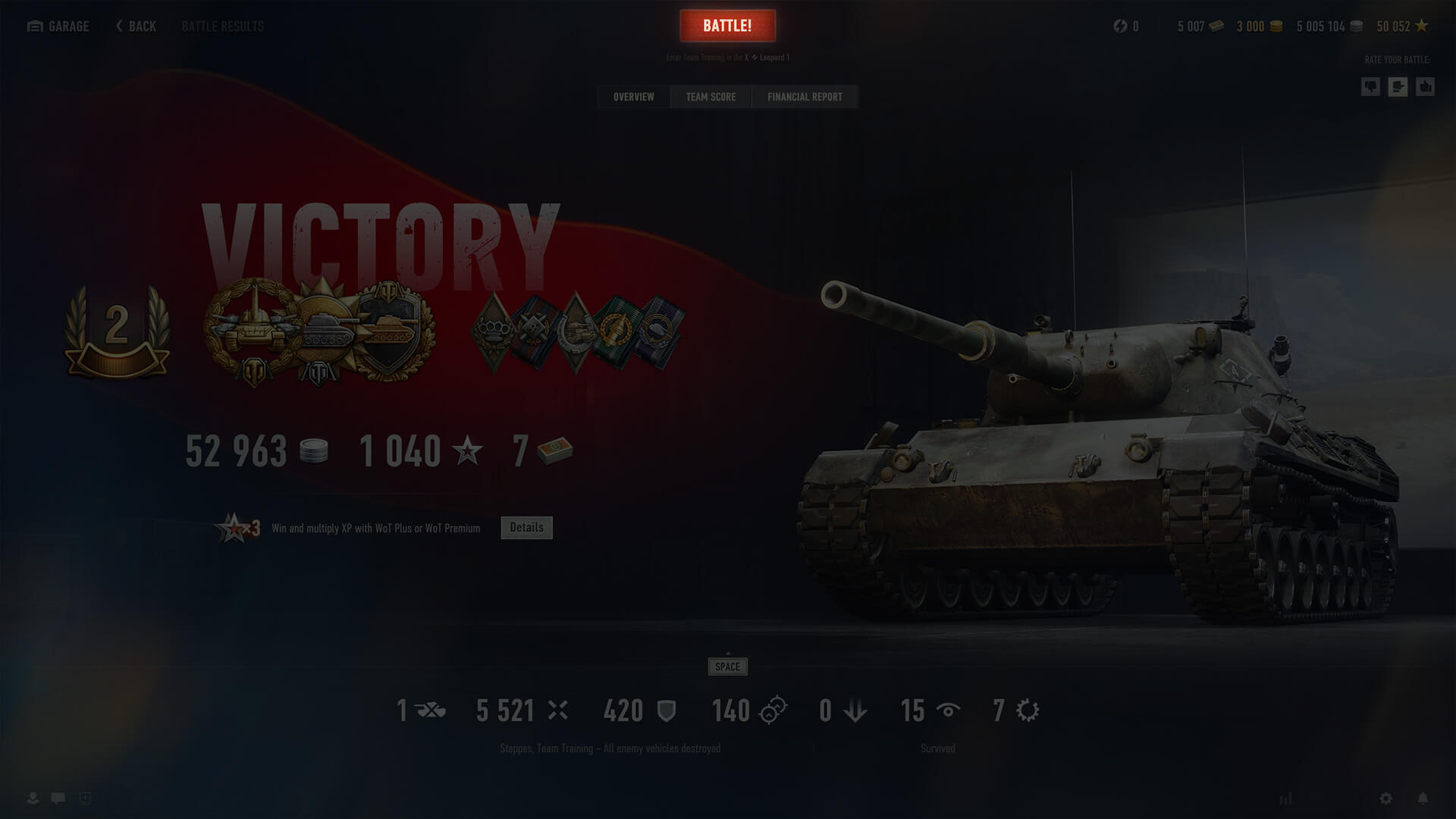
All tabs on the post-battle statistics screen now include a button that lets players either enter a new battle or confirm/cancel their readiness when playing in a Platoon.
Below the button, the selected mode and the vehicle for the next battle are displayed.
Hotkeys have been added to the menu in the center of the Garage and the My Vehicles screen, allowing for quick navigation to important screens—About Vehicle, crew, and customization—and enabling key actions linked to them.
The filter button in the Garage and on the My Vehicles screen now displays the number of selected vehicles/the total number of vehicles on the player's account when a user-created or imported Playlist is selected.
This update introduces new Random Events that change the dynamic of battle and expand tactical opportunities on three maps:
A German fighter jet crashes into the support of the bridge in D6, bringing it down and opening a new route from the gorge to the heights above.
A Japanese airstrike leaves a freight train scattered across the railroad tracks. Its derailed wagons provide cover in squares K9–0, blocking long-distance lines of fire and adding tactical variety.
Two MiG-21s strike the town's central sector with precision missiles. The resulting destruction reshapes the E6–F7 area, exposing new routes and elevated platforms and creating opportunities for more dynamic heavy-vehicle engagements.
A new sound physics system based on map geometry has been added for Random Battles in this Common Test, changing how vehicles sound depending on their position relative to objects on the map.
The types of sound simulation include:
New sound presets have also been added to the game settings and are automatically adjusted to the player's graphical configuration to ensure optimal performance and quality.
These changes are designed to help players more accurately locate enemies and allies using audio signals. They may slightly increase system load.
The sound physics simulation feature is available on the following Random Battles maps:
|
|
|
The following vehicle has been added:
The following vehicle has been added:
The following vehicle has been added:
The following vehicles have been added:
The following vehicle has been added:
The following vehicles have been added:
The following vehicle has been added:
전차장 여러분,
2.1 업데이트 미리 보기를 확인해 보십시오! 이번 업데이트에는 3가지 지도에 추가되는 신규 돌발 상황, 월드 오브 탱크 차고를 한층 효율적으로 이용할 수 있는 인터페이스 개선, 전장에서의 몰입감을 고조해 줄 효과음 시스템 향상 등 변경 사항이 준비되어 있습니다.
많은 플레이어 여러분의 의견을 따라 전투 결과 화면에서 바로 누를 수 있는 전투 시작 버튼이 추가됩니다. 빠르게 다음 전투를 시작하고 있다면 해당 버튼을 눌러 바로 출격해 보십시오. 번거롭게 차고로 복귀하지 않아도 됩니다.
승무원, 전차 꾸미기, 전차 비교 등 주요 메뉴를 빠르게 열 수 있는 단축키가 추가됩니다. 이를 통해 필요한 메뉴를 이전보다 빠르고 간편하게 열 수 있습니다.
무작위 전투에 지도 지형을 바탕으로 한 음향 물리 효과 시뮬레이션 기능이 추가됩니다. 해당 기술은 환경에 따라 효과음이 주변 환경과 어우러지는 방식을 더욱 자연스럽게 해주는 역할을 합니다. 이제 탑승 전차 및 주변 전차 소리가 들리는 방식에 지도 내 지형 지물과 각 전차의 위치 관계가 반영됩니다.
기하 음향 기술이 적용된 지도에서는 효과음 전파에 다음과 같은 유형의 시뮬레이션이 적용됩니다.
이를 통해 전장에서 효과음이 가져다 주는 몰입감과 정보가 한층 향상됩니다. 이제 음향 신호로 적과 아군의 위치를 더욱 정확히 파악할 수 있습니다.
또한, 게임 설정에 효과음 품질 사전 설정이 추가됩니다. 그래픽 설정과 마찬가지로 기기의 사양에 맞추어 성능과 품질의 균형을 조정할 수 있습니다.
음향 물리 효과 시뮬레이션 기능은 다음 무작위 전투지도에서 이용할 수 있습니다.
|
|
|
|
현재 연말연시 달력 이벤트는 개발 진행 중이며 추후 자세한 정보가 공개될 예정입니다.
개발 기간 공개되는 연말연시 달력 관련 요소는 실제 업데이트 이후의 내용과 다를 수 있다는 점을 참고해 주십시오.
이번 업데이트 기간에서는 연말연시 달력 이벤트가 진행될 예정입니다. 연말연시 달력은 차고에서 진열대 형태의 3D 상호 작용 오브젝트를 클릭하여 이용할 수 있습니다.
이벤트 진행 방식은 단순합니다. 일자별로 달력을 떼어내면 무료로 게임 아이템을 획득할 수 있습니다. 놓친 날이 있더라도 다음 날 접속하면 오늘과 어제의 선물을 획득할 수 있으니 걱정하지 마십시오.
새로운 업데이트에서 찾아올 변경 사항 및 개선 사항을 기대해 주십시오!
본 제품은 세계 각지의 연방의 일부, 주, 주권 정부, 군사 지부나 서비스의 허가를 받거나, 보증을 받거나, 제휴하지 않습니다. 군용 차량과 관계된 모든 상표와 상표권은 해당 권리 보유자의 소유입니다. 특정 군용 차량의 설계, 모델, 제조사, 버전은 오직 역사적 정확성을 담으려는 것으로 어떤 경우에도 상표 권리자의 후원이나 지지를 나타내지 않습니다. 모든 모델의 성능은 20세기 군용 차량의 기술적인 요소를 기반으로, 사실적으로 구현되었습니다. 군용 차량과 관계된 모든 상표와 상표권은 해당 권리 보유자의 소유입니다.
Wargaming Group Limited: 105, Agion Omologiton Avenue, Nicosia 1080, Cyprus 사업자등록번호 : 172-80-00777; 워게이밍 유한회사 대표: 룽 라자 술라이만 아르비손; 주소: 서울시 강남구 테헤란로 110, 캠브리지강남빌딩 11층; 전화: 070-4355-3075, 이메일: support_kr@wargaming.net; 사업자등록번호 : 120-87-86583; 통신판매업신고번호: 제2012-서울강남-02346호; 사업자정보확인
© 2009–2026 Wargaming.net All rights reserved.


